Product Showcase Kiosk
Build a touchscreen kiosk for car dealerships to showcase featured vehicles and promotions
Guide
Product Showcase Kiosk
In this guide, we will show you how to create a prompt that will help you build a product showcase website for a car dealership, to showcase this week's highlighted car and its promotion. The website can be used on touchscreen kiosks in the dealer.
The end result will be something looking like this:
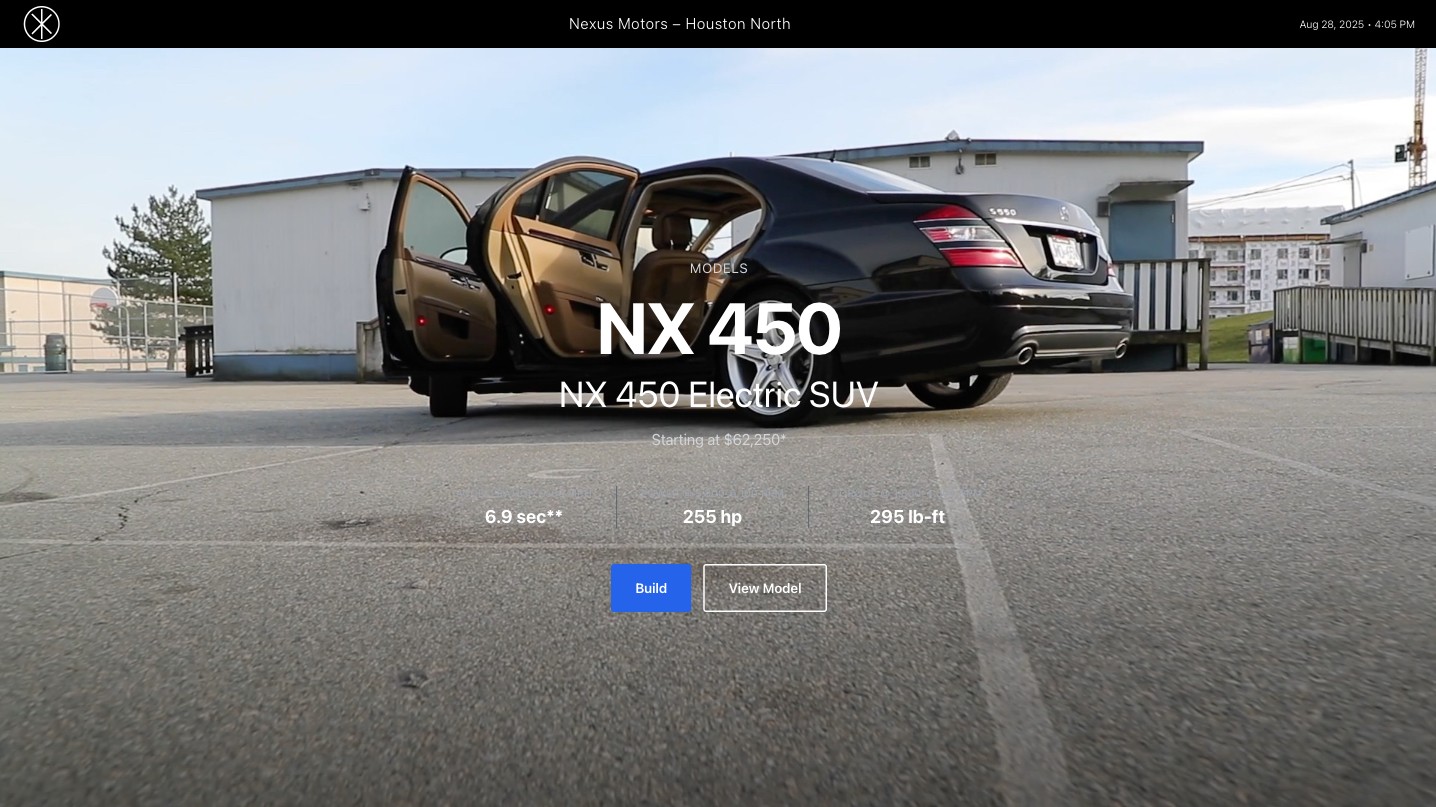
Your actual result will be a bit different as the Agent will code differently every time.
Introduce your goals
Give OptiDev Agent a bit of context on who you are and your end goal. This will help the agent a lot in achieving your goal:
"I'm a Marketing Coordinator for Mercedes dealer in North Houston. I need to create a kiosk page to be put on our touchscreen kiosk in dealer floor this week, we will highlight our E 450 4MATIC model and its promotions. The app should be optimized for kiosk, tablet displays."
Give it a reference
You can attach:
Paste screenshot of website, app, designs and tell agent to use it as reference
Attach PDF, doc for more information about your products, projects, etc.
Paste URL to website and tell agent to use it as reference
NOTE: Some websites/URLs block the agent from accessing them. In that case, your result will not have the input reference. You could:
Ask the agent directly if it can access the URL - it will tell you
Take a screenshot and paste instead of using URL
In this case we provide reference URLs:
Analyze these sample screenshots as reference for your design:
>
@https://optidev-public-cdn-dev.nyc3.cdn.digitaloceanspaces.com/templates-assets/product-showcases-1-thumbnail.jpg
TIP: Adding the @ sign will ensure the agent reads the files.
Describe the app functions
Just like you would tell a friend to build it for you:
For our app:
Home/attract screen: Use these 3 images for a slideshow, overlay with promotion text and buttons.
User can tap the screen to explore more.
Detail/product view area: More detail info with pictures, customer can scroll on the right to view options for the cars.
Final Prompt
### Purpose I'm a Marketing Coordinator for Mercedes dealer in North Houston. I need to create a kiosk page to be put on our touchscreen kiosk in dealer floor this week, we will highlight our E 450 4MATIC model and its promotions. The app should be optimized for kiosk, tablet displays. ### Requirements - Analyze these sample screenshots as reference for your design @https://optidev-public-cdn-dev.nyc3.cdn.digitaloceanspaces.com/templates-assets/product-showcases-1-thumbnail.jpg @https://optidev-public-cdn-dev.nyc3.cdn.digitaloceanspaces.com/templates-assets/product-showcases/product-showcases-home-portrait-1.jpg @https://optidev-public-cdn-dev.nyc3.cdn.digitaloceanspaces.com/templates-assets/product-showcases/product-showcase-detail-1.jpg @https://optidev-public-cdn-dev.nyc3.cdn.digitaloceanspaces.com/templates-assets/product-showcases/product-showcase-detail-portrait-1.jpg For our app: Home/attract screen: Use these 3 images, for a slideshow, overlay with promotion text and buttons. https://optidev-public-cdn-dev.nyc3.cdn.digitaloceanspaces.com/templates-assets/product-showcases/mercedes-car-hero-1.jpg https://optidev-public-cdn-dev.nyc3.cdn.digitaloceanspaces.com/templates-assets/product-showcases/mercedes-car-hero-2.jpg https://optidev-public-cdn-dev.nyc3.cdn.digitaloceanspaces.com/templates-assets/product-showcases/mercedes-car-hero-3.jpg Our current promotion: - Limited time financing 1.99% $0 down - this month only - Plus Complimentary 3-Year Prepaid Maintenance User can tap the screen to explore more Detail, product view area More detail info with pictures, customer can scroll on the right to view options for the cars - Use these images in details, product view area https://optiedge-public-cdn-dev.nyc3.cdn.digitaloceanspaces.com/templates-assets/optiedge-product-showcases-1-template/car-2.jpg https://optiedge-public-cdn-dev.nyc3.cdn.digitaloceanspaces.com/templates-assets/optiedge-product-showcases-1-template/car-3.jpg - Need to work both landscape and portrait mode - Generate 2-3 images and use them in the app as you see fit. Useful info to show: - Date Time